AI tools can brighten a room, replace a sky or make an evening version of a photo. They can also change details you never asked them to. Decide what you want to edit, keep the original, and compare the two before you publish.
In this guide
Which edits need closer attention?
“AI edited” covers too much to mean anything on its own. One tool balances the exposure. Another swaps the sky, furnishes a room, erases a power line or builds a whole new wall that was never photographed. Before you touch a file, decide what kind of change you're making and which details of the property have to stay the same.
Keep the related tools separate in your head too. A generated property description, a 3D tour, a digital twin, a floor plan or a renovation concept can all help sell a home, but none of them is a photo correction. Each one needs its own accuracy check, and none should borrow credibility from the real photo sitting next to it.
Exposure, white balance, gentle colour work, local contrast, mood and time of day can all be useful changes, as long as you can still clearly see the real property.
Replacing the sky, removing objects, cleaning up the lawn, the view out the windows, virtual staging and changing surfaces can all change what a buyer thinks is physically there.
The architecture, dimensions, how the rooms flow, permanent fixtures, built-ins, finishes, access, condition, significant defects and real views shouldn't be quietly changed.
What AI editing can help with
A responsible edit makes the same space easier to read. Fixing a colour cast, pulling back shadow detail, straightening a leaning wall or moving towards a believable evening can all help the photo say more. None of it claims the house has a different layout or finishes it doesn't have.
| Common edit | Useful when | Stop when |
|---|---|---|
| Exposure and colour | The rooms and materials are easier to read | Windows, finishes or condition are hidden or shown inaccurately |
| Perspective and crop | The verticals are straight and the composition is clearer | The crop hides something relevant, or the lens correction changes how big the room looks |
| Sky and atmosphere | The house is still the subject and the light is still believable | The weather, view, shadows or reflections don't agree with the new sky |
| Lighting and twilight | The existing surfaces, fixtures, furniture and layout stay as they are | The edit adds lights, windows, furniture, landscaping or structure that isn't there |
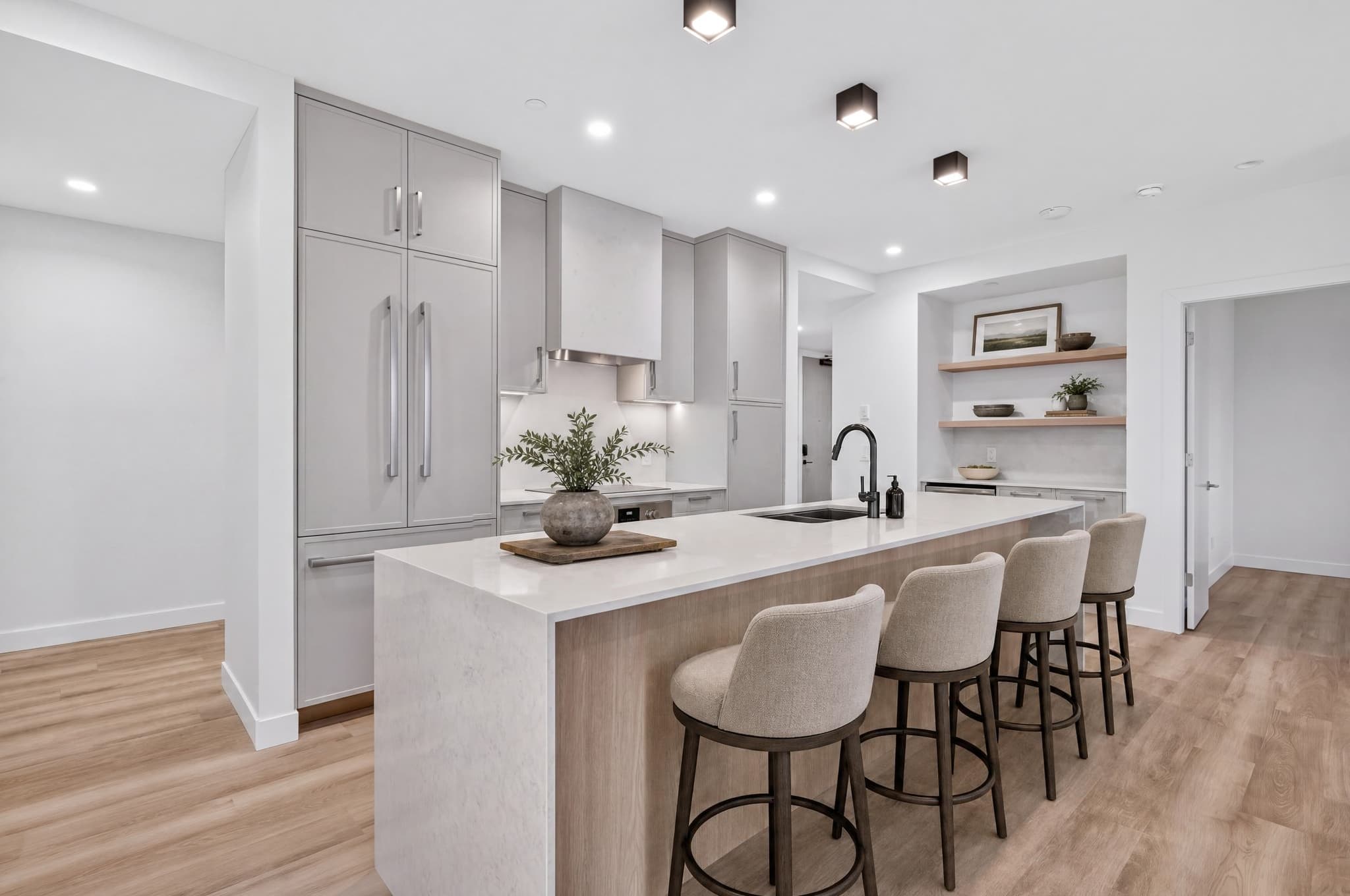
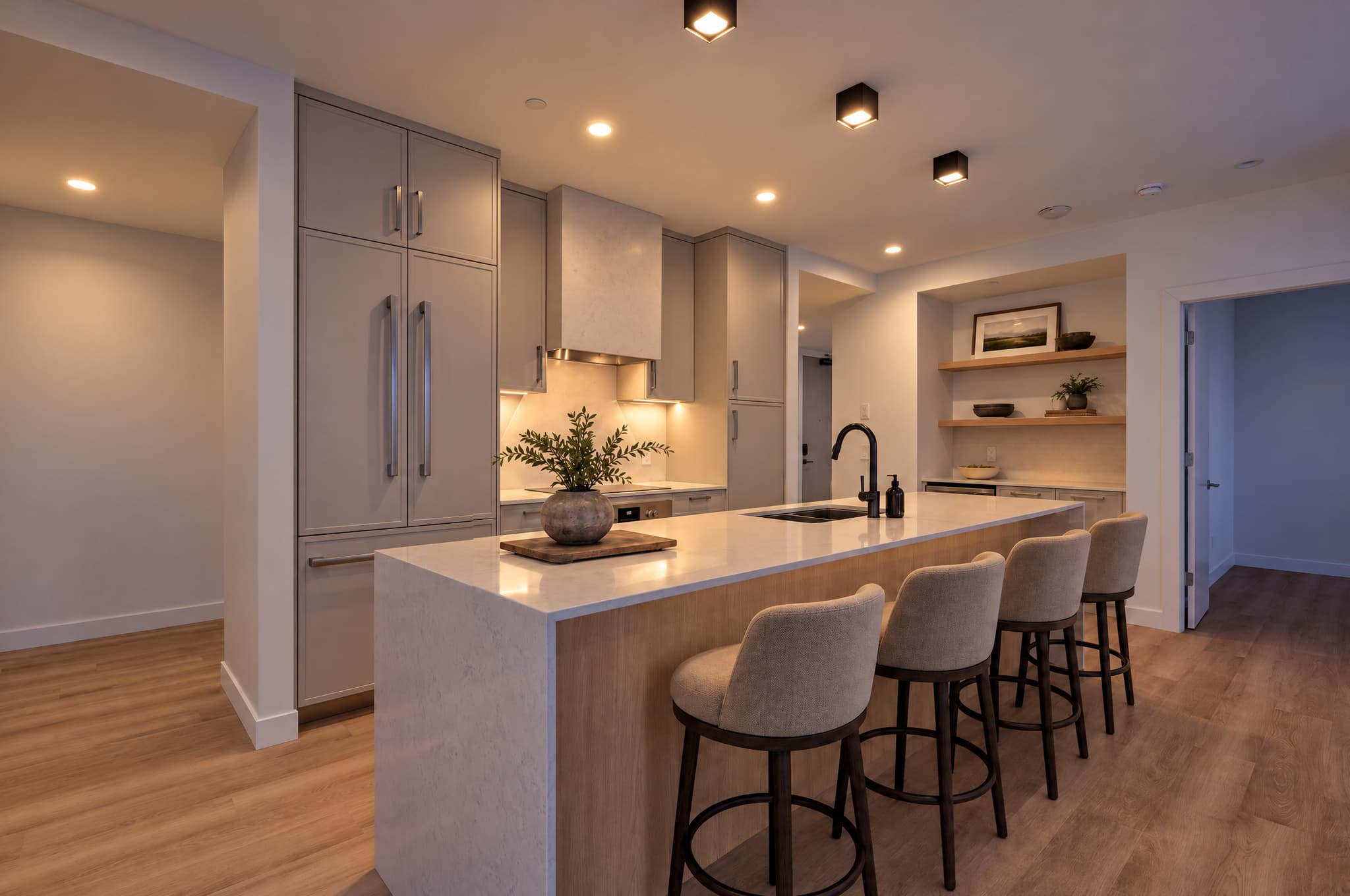
The time of day and the lighting change. Afterwards, compare the cabinets, island, stools, shelves, tap, doors, fixtures, floor and layout. The furniture was already in the room before relighting.
What must remain an honest representation
The simplest test is a practical one: would a reasonable person be surprised when they walked in the door? NAR's Code of Ethics tells REALTORS® to avoid misrepresentation and present a true picture in their advertising, and its standards specifically warn against misleading images. NAR's MLS policy on photos says the same thing: images an MLS requires should accurately show the listed property. The exact rules for submitting and disclosing still vary from one MLS to the next.
Details to check after an AI edit
- The shape of the building, rooflines, windows, doors, balconies, railings and the way in.
- The edges of rooms, doorways, ceiling height, stairs, built-ins and how you move between rooms.
- Permanent fixtures, cabinets, counters, appliances, flooring, tile and hardware.
- The condition, visible damage, unfinished work and significant defects.
- The real view, neighbouring buildings, power lines and poles, and the garden layout.
- Reflections and glass, which can give away that part of the image still shows the original scene.
Virtual staging and object removal need a different label
Adding furniture, changing a wall finish, replacing a floor, taking out a permanent feature or showing a renovation isn't just “enhancement”. It shows how the place could be, not how it is. That can still help a buyer imagine the space, but it isn't a documentary photo and shouldn't be presented as one.
Removing temporary camera glitches, or a gentle tonal correction that keeps the original scene and its condition.
Furniture, paint, flooring, renovation ideas, seasonal landscaping and deleted objects should be clearly labelled, and shown next to the original when that's required or helpful.
Zillow is a useful benchmark here. In its own listings, virtual staging is something the buyer chooses to turn on, it's clearly labelled, and it's shown next to the original photo so the two can be compared. Zillow supports disclosure when AI meaningfully alters a listing photo, and some markets, California among them, already require it through MLS rules or state law.
Compare the edit with the original
- Say what you're changing: write one sentence describing what the edit is meant to do.
- Look at the original and the result together: don't rely on memory, and don't just judge whether the result looks nice.
- Follow the edges: check the walls, ceilings, floors, windows, doors, stairs, railings, cabinets, fixtures and views.
- Zoom in on the weak spots: check fine edges, reflections, text, artwork, handles, window frames and repeating patterns.
- Look for anything quietly added or removed: count the fixtures, furniture, openings and garden features you can see.
- Think like a buyer: ask what someone would now believe exists, comes with the house or is in better condition.
- Decide: publish it, redo it, label it as a visualisation, show it next to the original, or reject it.
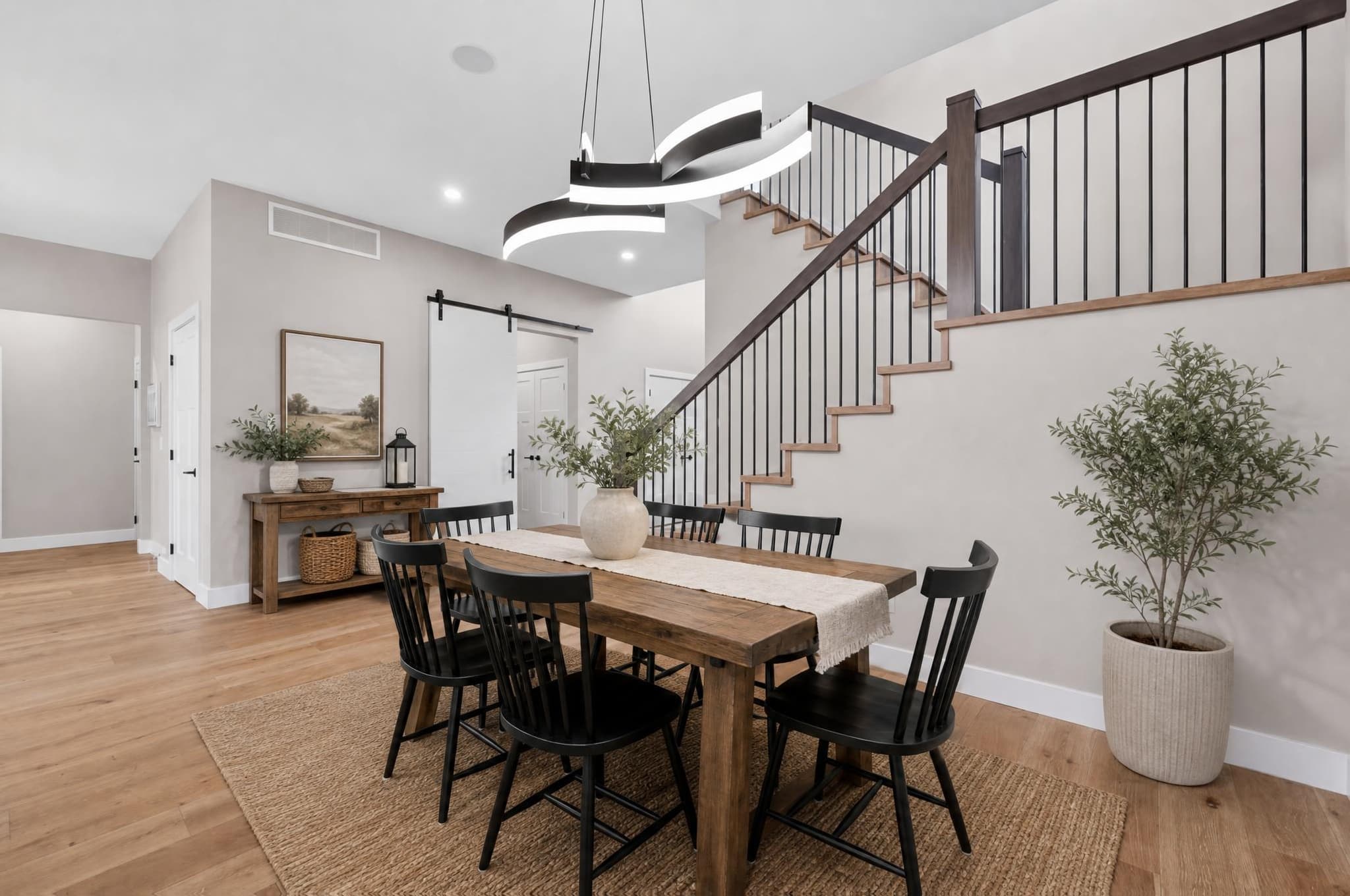
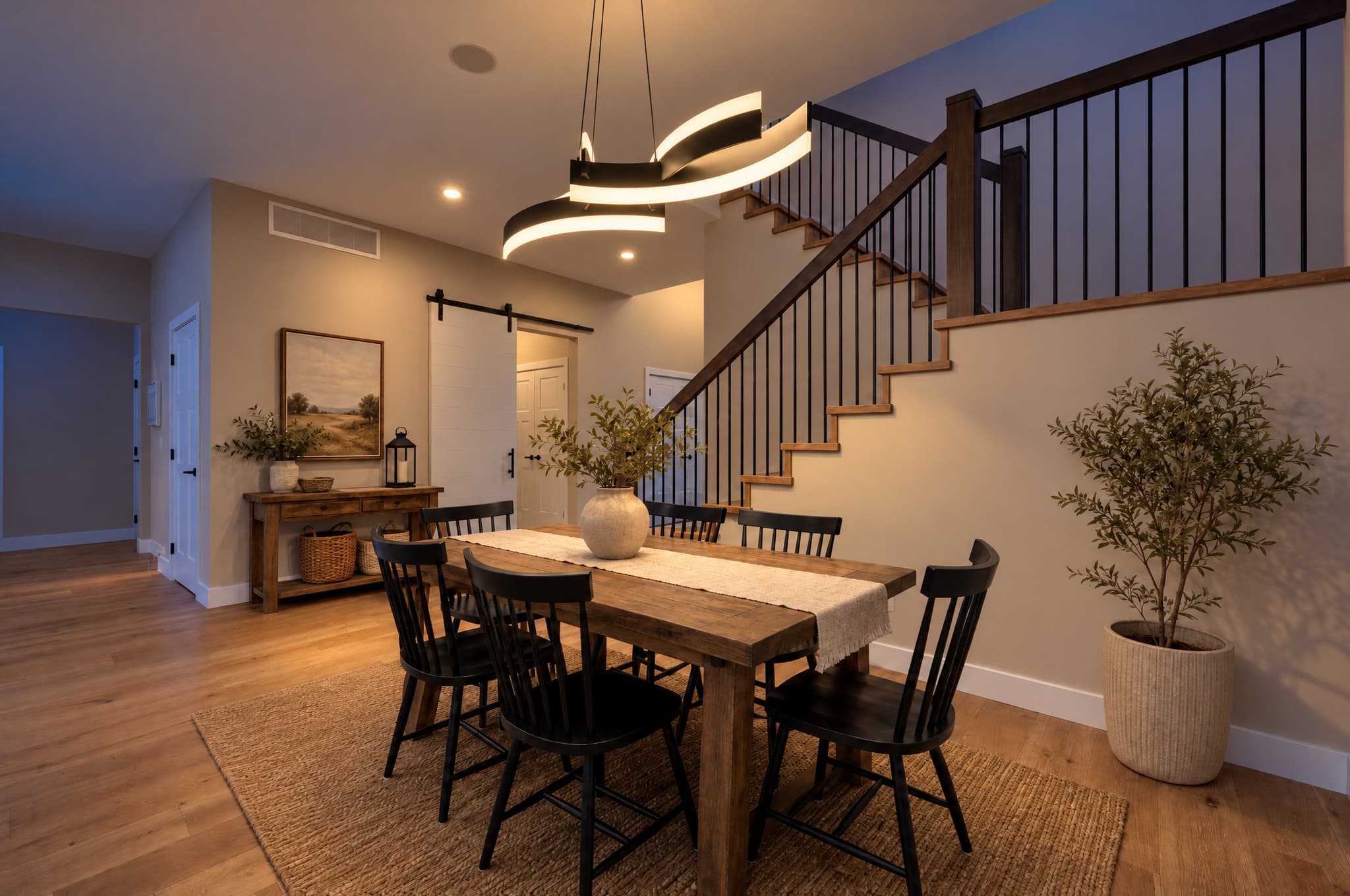
Six chairs, the shape of the stairs, the railings, light fitting, doors, artwork, plants, floor and rug give you plenty to check. The result only earns its place if every one of those still matches.
I discovered that some agents were putting delivered photos through other AI tools without telling me. A few versions came back with distorted floors, ceilings and furniture, but could still be associated with my photography.
I added wording to my contract to make clear that unauthorized third-party alterations were not my work. That was a decision about my own business, not a contract template or a substitute for legal advice.
Make one result, then compare it with the original using the checks above.
Privacy starts before the upload
A property photo can include personal information even when there's nobody in it. Family photos, a child's name on the wall, mail on the counter, alarm panels, door codes, licence plates. Computer screens, calendars, prescription labels. Any of these can end up in the file, sometimes just as a reflection in a window or a pot.
- Remove or cover sensitive things before you shoot when you can. Preventing it is more reliable than fixing it later.
- Make sure you have permission to upload and edit the photo, including any photographer or client usage terms.
- Check the editing service's privacy, retention, deletion and AI-training terms before you send client work.
- Keep the original in a project folder you control, and don't save the edited version over it.
- Check the finished image again for personal information, reflections and any stray generated text.
Disclosure depends on the edit and its destination
No single rule covers every listing, platform and location. Local MLS rules, brokerage policy, advertising law, state or provincial requirements and the site you're publishing on can all have a say. Treat general advice, this guide included, as a starting point, not a replacement for checking the actual rule that applies to your listing.
Keep the untouched original, note what changed, and check the current rules for where it's going before you deliver. A real visualisation deserves a clear label, and showing the original next to it is often the most open way to present it. For a lighting-only result, use accurate words like “virtual twilight” rather than presenting it as a photo taken at that time of day.
NAR's Code of Ethics asks REALTORS® to present a true picture and avoid misleading images, and Zillow's current guidance supports disclosure for listing photos that have been meaningfully altered, with some markets already requiring it. Both are useful reference points. Neither replaces the specific rules for your listing, so check those directly before you publish.
AI real estate photo editing FAQ
What can AI change in a real estate photo?
AI tools can adjust exposure, colour, contrast, the sky and the mood. Some can also remove objects, swap surfaces, add furniture or rebuild parts of a scene. Just because an edit is possible doesn't make it right for a listing. Judge every change by whether it changes what a buyer understands about the actual property.
What should never be changed in a listing photo?
Don't add, hide, enlarge, move or meaningfully change anything permanent about the property. The architecture, layout, windows, doors, fixtures, built-ins, condition, access, views and any significant defects should honestly show what a visitor will find.
Is sky replacement allowed in real estate photography?
Some places accept a sky or lighting edit as long as it doesn't hide the property or make its condition look better than it is, but the rules vary by MLS, brokerage, platform and location. Keep the original, check the current rules for where it's going, and disclose real alterations where you're required to.
Should virtually staged or AI-edited photos be labeled?
Be open about real changes. Zillow says its own virtual staging is clearly labelled and shown next to the original, and it supports disclosure for listing photos that have been meaningfully altered. Your local MLS or the law may be more specific, so check the exact destination before you publish.
How do I review an AI-edited property photo?
Put the original and the result side by side at full size. Check the edges of the room, windows, doors, fixtures, furniture, finishes, reflections, views, garden and visible condition. If something's different and it isn't explained by the light, colour, crop or a clearly labelled visualisation, stop and look into it.
Does Relight Spaces add or remove furniture?
No. Relight Spaces only changes the lighting. It changes the direction and mood of the light in the photo you upload. It isn't a virtual staging or renovation tool. The furniture in these examples was already in the original photos.